Nothing leaves your Mac

Mac apps that keep your data on your Mac.

SecureMacApps is a growing collection of native macOS utilities built on one rule: your files, your habits and your information never leave your computer. One plan unlocks every app — from $1 a month, or $50 once for life.

7-day free trial, no card No account No analytics Works offline Cancel in one click
The collection

One subscription. Every app.

Each app does one job well and does it offline. New apps join the collection as they ship, and your subscription covers them automatically.

CleanSpace icon

CleanSpace

Available nowDisk cleaner · v2.0.2

Free up disk space on your Mac without guessing what is safe to delete.

CleanSpace finds what is filling your disk — caches, system junk, old downloads, leftovers from deleted apps and large files you forgot about — shows real sizes, and removes only what you select. Every scan runs on your Mac. Nothing about your files is ever uploaded.

  • Nothing uploaded
  • Works offline
  • No tracking
  • 1 permission, explained

macOS 13 Ventura or later · Apple silicon & Intel · 4.2 MB

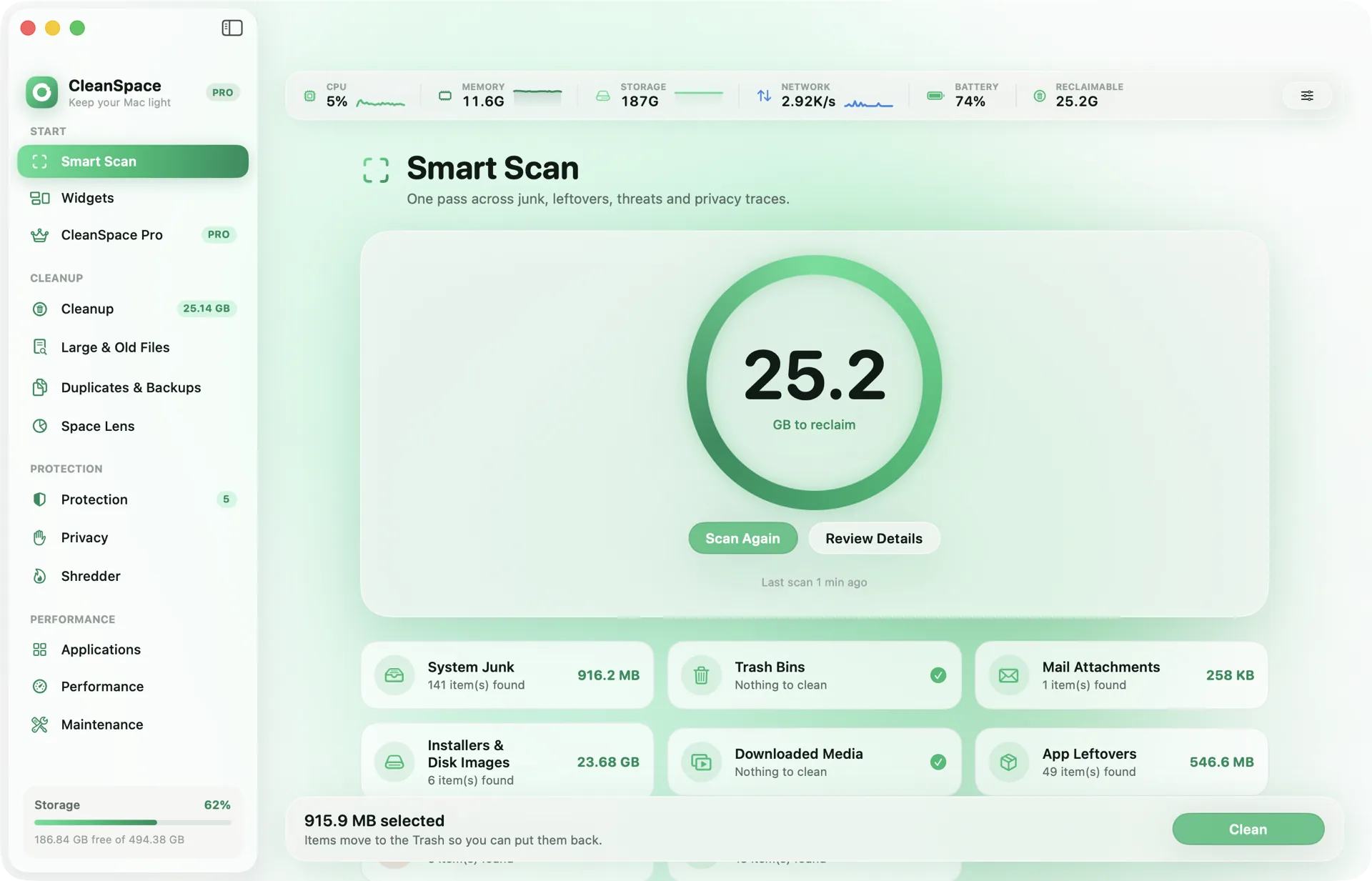
CleanSpace Smart Scan showing 25.2 GB to reclaim across system junk, installers, mail attachments and app leftovers

More on the way

Included at no extra cost

We add a new app when it meets the same bar: useful every week, native, and entirely on-device. Subscribers get each one the day it ships.

Privacy by architecture

Private because of how it is built, not because we promise.

A privacy policy can change. An app that has no code to upload your data cannot. These are the rules every SecureMacApps app ships under.

Processed on your Mac

Scans, analysis and changes run locally, with the CPU you already own. No file, file name or result is ever sent to a server — ours or anyone else’s.

No telemetry. None.

No analytics SDK, no crash reporter, no “anonymous usage statistics”. We do not know which features you use, or which of our apps you have installed.

No account to breach

Your activation key is your account. There is no password database, no profile, no sign-in — so there is nothing of yours to leak.

Offline licence check

Your licence is signed with Ed25519 and verified on the Mac itself. Apps talk to us once to activate and at the end of each paid period to renew — never to run.

Signed and notarized

Every build is signed with our Apple Developer ID and notarized by Apple, so macOS can confirm it came from us and has not been altered.

Least privilege

An app asks macOS only for the permissions its job needs, says why in plain words, and keeps working in a reduced mode if you say no.

Full disclosure

Every request our apps can make. All five of them.

This is the complete list of network traffic from any SecureMacApps app. If you ever see anything else, it is a bug and we want to hear about it.

  1. ActivateKey / hash only
    securemacapps.com/api/v1/activate
    Sends
    Your activation key and a one-way hash of this Mac’s hardware ID
    When
    Once, when you enter a key
  2. RenewKey / hash only
    securemacapps.com/api/v1/refresh
    Sends
    The same key and hash
    When
    At most once every few hours, only in the last week of a paid period
  3. Free trialKey / hash only
    securemacapps.com/api/v1/trial
    Sends
    Only the one-way hash of this Mac — no email, no name, no card
    When
    Once, if you press Start free trial
  4. Update checkSends nothing
    securemacapps.com/api/v1/apps/<app>/latest.json
    Sends
    Nothing — a plain request for the latest version number
    When
    At most once a day, unless you turn update checks off
  5. PriceSends nothing
    securemacapps.com/api/v1/prices
    Sends
    Nothing — a plain request for the current price
    When
    When you open the upgrade screen
  6. Check it yourself
    • The machine hash is one-way SHA-256 — it cannot be turned back into your serial number or hardware ID.
    • Everything goes only to securemacapps.com over HTTPS. Our host sees your IP like any website; we never store it.
    • Watch it live with a free monitor like LuLu.
    How the licence works
Pricing

Every app. Pick how you pay.

Same apps and updates on every plan — monthly, yearly or once for life. No tiers, no upsells, no “pro” add-ons.

Try every app free for 7 daysNo email. No card. Nothing to cancel. Start it from inside any app.
Download an app

Monthly

$1/month

Billed monthly · cancel any time

Start monthly
  • Every app, billed monthly
  • Cancel online in one click
  • Perfect for trying everything

Lifetime

Best long-term value
$50once

One payment · yours for good

Buy lifetime
  • Costs the same as 5 years of yearly
  • No renewals, ever
  • Every future app included

Every plan includes

Secure checkout by Razorpay · Cards, UPI, netbanking

  • Every app, full versionNo feature locks, no separate purchases.
  • Every future appNew releases join your plan automatically.
  • All updatesEvery improvement, the day it ships.
  • One key for all appsActivate once — every app on that Mac unlocks.
  • Works offlineLicence verified on your Mac, no check-ins.
  • Add more MacsChoose how many at checkout, up to 100.

Apps in every plan

CleanSpaceDisk cleanerEvery future appIncluded automatically
0trackers or analytics
0files ever uploaded
1key for every app
Questions

Straight answers

Do SecureMacApps apps upload my files or data?

No. Every app does its work on your Mac. There are no analytics, no crash reporters, no ad SDKs and no accounts. The only network request an app makes is to activate or renew your subscription, and that carries your activation key and a one-way hash of the Mac’s hardware ID — nothing about your files or how you use the app.

How can I verify that for myself?

Run a network monitor such as LuLu (free, open source) or Little Snitch while you use an app. You will see no connections at all except to securemacapps.com when you activate or when a paid month is about to end. Our security page lists every request each app can make.

What does a plan get me?

Every app in the collection, on one Mac, with every update — and every new app we release, at no extra cost. Pay $1 a month, $10 a year, or $50 once for lifetime access. You can add more Macs at checkout.

Is there a free trial?

Yes — 7 days of every app, with nothing asked of you. Press Start free trial inside any app: no email, no card, no account. The only thing sent is the same anonymous machine hash used for activation, so each Mac gets one trial. When it ends, the apps go back to their free mode; there is nothing to cancel.

Is there a yearly or lifetime option?

Yes. Yearly is $10 a year — two months free compared with monthly. Lifetime is $50 once: every current and future app, with no renewals. Every plan includes exactly the same apps and updates.

Do the apps work offline?

Yes. Your licence is signed and checked on the Mac itself. An app only needs the internet once to activate, and near the end of each paid period (or once a year on lifetime) to pick up the renewed licence. If you are offline when that happens, the app keeps working for a week of grace and asks again later.

How do I cancel?

On the account page. Enter your key or your email: with both you can cancel straight away, and with just one we email a manage link to the address on file. Cancelling stops the next charge; the apps keep working until the end of the period you paid for. Lifetime has nothing to cancel. No phone call, no retention offer.

Why is there no account or password?

Because we do not want to hold data we do not need. Your activation key and your email find each other: with either one you can get the other, and a manage link sent to your inbox lets you cancel. A database with no passwords in it is one that cannot leak passwords.

Which Macs are supported?

macOS 13 Ventura or later, on Apple silicon and Intel. Every app is signed with our Apple Developer ID and notarized by Apple.

Your data, your Mac

Useful Mac apps shouldn’t cost you your privacy.

Download any app and start a 7-day free trial of everything — no email, no card, nothing to cancel.